Showing posts with label python. Show all posts

Friday, 20 December 2019

Playing around with Jupyter Notebook, Sketch RNN & Neural Style Transfer


This week as part of my work I went to a 2-day crash course in Tensorflow for NLP, which is admittedly ridiculous because (a) 2-days? what can one accomplish in 2 days? would we not be better off slowly studying ML via a mooc on our phones? or the Google Machine Learning Crash Course? and the official Tensorflow tutorials? (b) I am struggling with both the practical side (I have absolutely no maths foundation) and theorectical side (I don't even understand regression models, but, I mean, do I need to understand regression models anyway?)

Which then begs the question: DO I REALLY NEED TO PEEK INSIDE THE BLACK BOX IN MY LINE OF WORK?

Or, WHAT IS MY LINE OF WORK ANYWAY? And how much technical understanding do I really need to have?

Now I obviously don't feel like I'm in any position to design the innards of the black box myself, but I'd like to be the person who gathers up all the inputs, preprocesses it, and stuffs it through the black box myself, so as to obtain an interesting and meaningful output (basically I'm more interested in the problem framing). But existential crises aside, this post is to gather up all my thoughts, outputs (ironically unrelated to the course I was at, but this is a personal blog anyway), and relevant links for the time being (pfftshaw, with the rate at which things are going they'll probably be outdated by 2020...)

Jupyter Notebook


Jupyter Notebook is the wiki I wish I always had! Usually when working in Python you're always in the shell or editor and I make my wiki notes in a linear fashion to recount the story of what I was doing (in case I want to revisit my work at a later point). For the purposes of learning I find it most useful to think of it as a linear narrative.

Jupyter is the new shell where you can do precisely that - write a linear narrative of what you think you were doing - alongside the cells of your code that you run. Its generally quite easy to set up Jupyter notebook via Anaconda which will install both Python and Jupyter Notebook and then you can paste the link from terminal into your browser.


I could have embedded my notebooks instead of screenshotting it but I ain't gonna share my notebooks cos these are just silly "HELLO WORLD" type tings...

Let's say you don't want to run it on local environment. That's fine too because you can use the cloud version - Google Colab. You can work on the cloud, upload files and load files in from Google Drive. You can work on it at home with one computer and then go into the office and work on it with another computer and a different OS. You can write in Markdown and format equations using LaTeX.

As an interactive notebook there are so many opportunities for storytelling and documentation with Jupyter Notebook. And if you like things to be pretty, you can style both the notebook itself or style the outputs with css.

Sketch RNN


I followed the Sketch RNN tutorial on Google Colab to produce the following Bus turning into a Cat...


Love the Quick Draw project because it is so much like the story I often tell about how I used to quiz people about what they thought a scallop looked like because I realised many Singaporeans think that it is a cake instead of a shellfish with a "scalloped edge shell".

I love the shonky-ness of the drawings and I kinda wanna make my own data set to add to it, and perhaps the shonky-ness is something I can amplify with my extremely shonky usb drawing robot which could use the vector data to make some ultra shonky drawings in the flesh.

Now that I have accidentally wrote the word shonky so many times I feel I should define what I mean: "shonky" means that the output is of dubious quality, and for me the term also has a certain comedic impact, like an Eraserhead baby moment which ends in nervous laughter. (Another word I like to use interchangeably with "shonky" is the Malay word "koyak" which I also imagine to have comedic impact)


Eg: When Tree Trunks explodes unexpectedly...

Neural Style Transfer


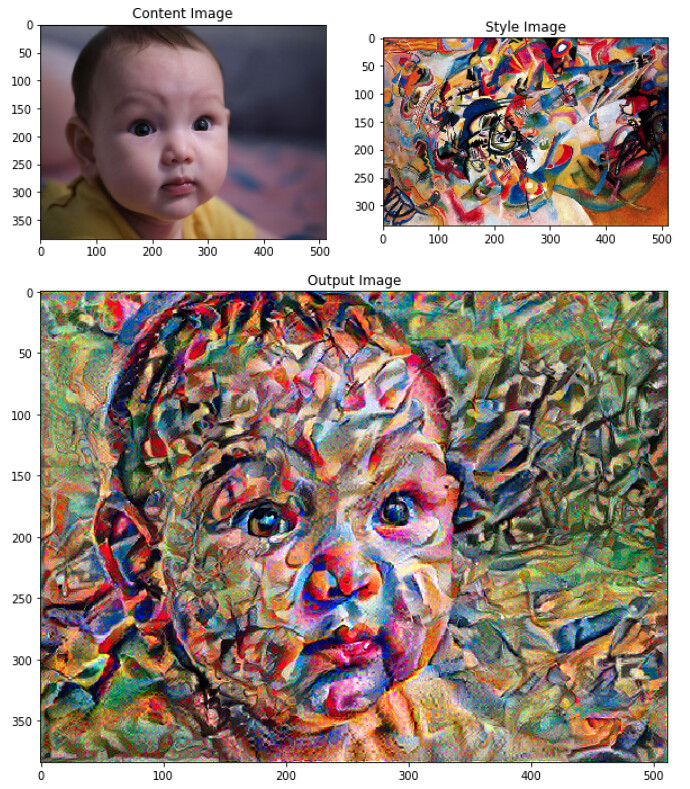
I followed the Neural Style Transfer using tensorflow and keras tutorial on Google Colab to produce the following:

Beano x Hokusai
Neural Style Transfer with Eager Execution - Colab3

Beano x Van Gogh's Starry Night
Neural Style Transfer with Eager Execution - Colab4

Beano x Kandinsky
Neural Style Transfer with Eager Execution - Colab5

Beano x Ghost in the Shell
Copy of Neural Style Transfer with Eager Execution gots

Beano x Haring
Copy of Neural Style Transfer with Eager Execution_haring

Beano x Tiger
Copy of Neural Style Transfer with Eager Execution_tiger

Beano x Klee
Copy of Neural Style Transfer with Eager Execution

How does this work? In the paper it describes how you can try to find out what is the style of an image by including feature correlations of multiple layers in order to obtain a multi-scale representation of the original input image, thus capturing its texture information but not the global arrangement. The higher levels capture the high-level content in terms of objects and their arrangement in the input image but do not constrain the exact pixel values of the reconstruction.


Image Source: "A Neural Algorithm of Artistic Style" by Leon A. Gatys, Alexander S. Ecker, Matthias Bethge

Sunday, 28 April 2013

Ghost Trap: Markov Text Generator

This post is overdue, as I have been meaning to type this out since the previous month! I had been asked to design a Mouse Trap and a Ghost Trap as an "entrance exam" for a postgraduate programme I had been applying to (and if you must know, that endeavour was successful!!!), and I thought it would be good to record the process of making the Ghost Trap in particular, for it has proven to be a very useful tool in other projects (and for playing around with words...)

mousetrap

A Mouse Trap

The Mouse Trap I designed was cute but quite normal by most standards; I won't pretend to be a product designer, but the Ghost Trap was clearly meant to be the more exciting exercise of the two. Firstly, I don't believe in ghosts, having not seen one, and there was no reason to try to imagine ghosts in the supernatural sense if there wasn't anything there to begin with, so I felt it was more appropriate to contemplate the idea of a ghost trap vis-a-vis digital presence. Secondly, another thing to note is that I am more of a "hobby" programmer than a serious programmer, so whatever solution it was also had to be realistically possible to execute over one weekend (which had been the time I had to develop this). I didn't have the luxury of time to invent something fantastically complicated.

So, the simpliest idea was to generate the ghost of myself. As those of you who follow this blog will know, I write a lot here, and this basically sounds like Debbie speaking in real life, obviously because I wrote it). Another thing I do is use foursquare and flickr a lot. For people following my updates and reading all of the gratuitous amount of information and digital flotsam that I generate each and every day, this might constitute all of what some people might ever see or hear of Debbie. My digital footprint could be, in some ways, the only surviving evidence of Debbie. So what if Debbie wasn't there but something else continued generating and posting what I would probably say on my blog, and posting location information about Debbie? Would people believe in the ghost of Debbie?

The first thing I wanted to do was to fake Debbie's location. I tried compiling some stats from my currently active flickr and foursquare account:

525603193

525603203

525603209

My current flickr account started in October 2007
As of 17 March 2013, I have uploaded 37843 items to it.
It is 1995 days from the start date to the end date, end date included
Or 5 years, 5 months, 17 days including the end date.
All photos taken with my smartphone have been uploaded to flickr with geodata.
I have developed a habit of uploading every single digital photograph I have ever taken as soon as possible without editing. I also take photographs of notes, receipts, places I want to remember, but I file these as Private only.
Out of these 37843 photos, 24063 have geodata.
I have taken an average of 12.0616541353 geotagged images every day between 1 October 2007 and 17 March 2013

525603195

My current foursquare account was started on 9 October 2010.
From and including: Saturday, October 9, 2010
To and including: Sunday, March 17, 2013
It is 891 days from the start date to the end date, end date included
Or 2 years, 5 months, 9 days including the end date
As of 17 March 2013, I have made 1,115 Check-ins.
Most check-ins were only made when I wanted to find other tips and users in the area.
I have made an Average of 1.25140291807 Check-ins every day between 9 October 2007 and 17 March 2013

After looking at the sheer number of records, it looked like it would take too long to extract and process all the location data of Debbies (to produce a decent result), I thought it would be better to just generate a text which sounded like it had been written by me. This could be more quickly accomplished by what I thought would be a much simpler method: a markov text generator.

A Markov text generator is something that uses a markov chain to generate the next word in a sentence. The choice of the next word only depends on the current last word, and not on the entire sentence of all the words before that, and so in that sense it does not have memory ("markov property") despite often seeming to be smarter or more complex than it actually is.

It was not hard to find simple applications of it in action, as many spammers have used markov text generators to generate realistic looking paragraphs which are actually gibberish but then make it through spam filters. In fact, I first came into contact with the term while trying to figure out why I was receiving these realistic looking paragraphs of pure gibberish which were spam except in many cases there were no advertising links, thus rendering the spam pointless.

I found a simple example in python that I could read the code for (something that i could completely understand how it worked) and apply to my own text. The idea is that all the text is broken up and recorded as 3 word groups. For every A-B-C set of words, it checks: for each A-B, what is a possible C? After all the sets of A-B and possible Cs are recorded (if C occurs many times, then it will be repeated in the list of possible Cs for that A-B set, thus increasing the probability we will see that C returned after A-B. And of course, with location data, the same procedure could be applied to determine what would be a likely C Location for any particular A-B set of locations.

Screen Shot 2013-03-17 at 10.42.48 PM.png

Screen Shot 2013-03-17 at 10.42.53 PM.png

Next I generated a big text file of all the text in my blog. This was to be the base material for the debbietext to be generated.

Screen Shot 2013-03-17 at 10.39.46 PM.png

I ran the markov python script on the file and generated many fragments and snippets. I went on to tweak the script a bit along the way.

Screen Shot 2013-03-17 at 10.30.48 PM.png

From these snippets, I picked out a few I liked and compiled it into a full text with the punctuation cleaned up. For the interest of not making this blog any more of a piece of meta-writing than it already is, here is a generated text in image form.

Screen Shot 2013-04-29 at 12.52.27 AM.png

I used this markov generated text as the text for the newest Map without Buildings I have drawn, which is currently showing at Theo.do.lites (Lasalle ICA Gallery 1) as I had been working on that drawing at the time that I had been putting this together. So, what do you think? Does it sound like the ghost of debbie speaking?


To top this off, I wrote most of this blog post last night before falling asleep, and then at night I had a dream about visiting an old friend's house, browsing through his bookshelf, and picking up a 2nd hand copy of Jerome Rothenberg's The Lorca Variations. From there, I discovered that the copy of Lorca Variations was the exact copy of the book which I thought I had sold off some years ago. Even stranger still, I had been using the book as a diary, and some of my teenage diary entries had been scrawled inbetween the spaces of the pages! I had forgotten that I had used the book to write my personal diary notes, so I was shocked I had sold the book off without realising or remembering this! My friend had bought the book from a 2nd hand book dealer without realising what was inside the book - because he only collected books and did not read any of them.

I woke up soon after that dream, and upon waking I went to google the description of "The Lorca Variations", because I honestly could not recall what was in the book, except my general impression that the book had been really tedious and boring to me (sorry! but really not my cup of tea!) at the time I had read it for an English Literature module at NUS. I still remember it had been assigned to us by Dr Gwee Li Sui for the introductory EN2101 module, and I had tossed the book aside after that module and never looked at it since (except to try to hawk it off online to other unsuspecting literature students, but I can't even recall if I managed to sell it in the end...)

The blurb for "The Lorca Variations" on google books goes:
Having recently returned to translating Lorca, Rothenberg began to appropriate and rearrange items of Lorca's vocabulary and to compose a series of poems of his own that 'both are & aren't mine, both are & aren't Lorca.' As an original work, The Lorca Variations are, as he describes them, 'a way of coming full circle into a discovery that began with Lorca & for which he has stood with certain others as a guide & constant fellow-traveler.'
I can't believe my subconscious has reintroduced to me a book which I had completely forgot I had ever read. And at a time when I am working on a project like this.